
24.3K 星开源神器!Serena:让普通 LLM 秒变专业 AI 代码助手
github热门推荐 › 24.3K 星开源神器!Serena:让普通 LLM 秒变专业 AI 代码助手 (第 20 章)
一、一句话看懂 Serena
GitHub 星标:24.3KSerena 是一款免费开源的 AI 编码代理工具包,能把你手里已有的 LLM(Claude、ChatGPT、Gemini、本地大模型等)直接升级成懂代码结构、能精准改项目、像 IDE 一样智能的全职代码助手,不用订阅、不用额外付费,接入就能用。
说人话:普通 AI 只会 “看文本改代码”,Serena 让 AI真正理解项目结构、符号、引用关系,能精准定位函数、自动查依赖、一键改逻辑、跑测试、提交代码,复杂项目也能从头到尾独立做完,效率直接起飞。
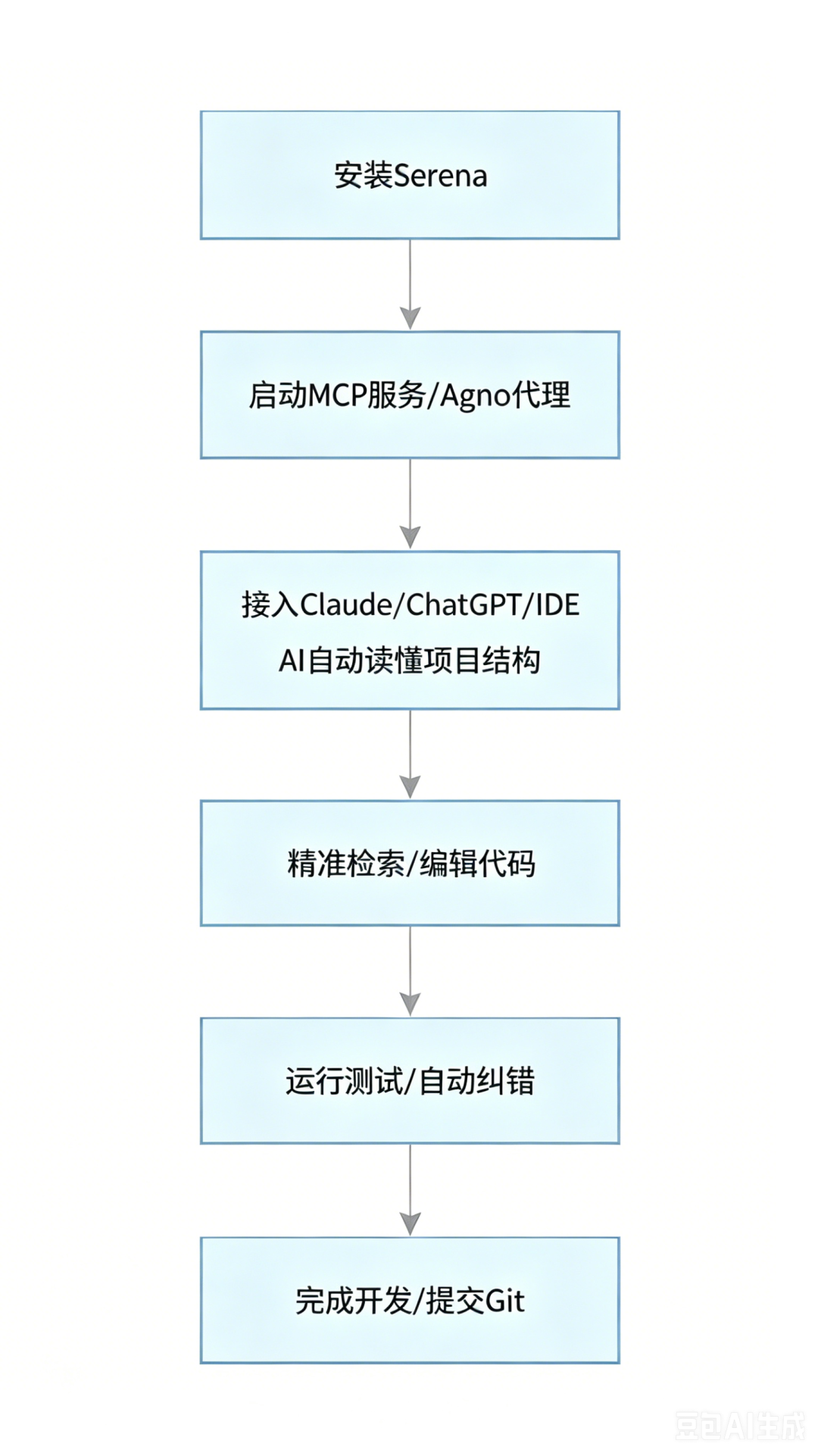
二、核心工作流程(一看就懂)
|
|
|
|---|---|
|
|
|
|
|
|
|
|
|
|
|
|
|
|
|
|
|
|
|
|
|
|
|
|
四、3 分钟快速上手(超简单)
1. 环境准备
安装 uv(项目管理器)
# 安装uv(一行命令)curl -LsSf https://astral.sh/uv/install.sh | sh
uvx --from git+https://github.com/oraios/serena serena-mcp-server
3. 接入 Claude Desktop(最常用)
File → Settings → Developer → MCP Servers → Edit Config写入以下配置:<span leaf=""><span class="code-snippet__punctuation">{</span></span></code><code><span leaf=""> <span class="code-snippet__attr">"mcpServers"</span><span class="code-snippet__punctuation">:</span> <span class="code-snippet__punctuation">{</span></span></code><code><span leaf=""> <span class="code-snippet__attr">"serena"</span><span class="code-snippet__punctuation">:</span> <span class="code-snippet__punctuation">{</span></span></code><code><span leaf=""> <span class="code-snippet__attr">"command"</span><span class="code-snippet__punctuation">:</span> <span class="code-snippet__string">"uvx"</span><span class="code-snippet__punctuation">,</span></span></code><code><span leaf=""> <span class="code-snippet__attr">"args"</span><span class="code-snippet__punctuation">:</span> <span class="code-snippet__punctuation">[</span><span class="code-snippet__string">"--from"</span><span class="code-snippet__punctuation">,</span> <span class="code-snippet__string">"git+https://github.com/oraios/serena"</span><span class="code-snippet__punctuation">,</span> <span class="code-snippet__string">"serena-mcp-server"</span><span class="code-snippet__punctuation">]</span></span></code><code><span leaf=""> <span class="code-snippet__punctuation">}</span></span></code><code><span leaf=""> <span class="code-snippet__punctuation">}</span></span></code><code><span leaf=""><span class="code-snippet__punctuation">}</span></span>重启 Claude,即可使用 Serena 全套能力。
4. 激活项目
在 Claude 里直接说:
激活项目 /你的项目路径AI 自动索引、读懂项目,开始干活。
五、Serena 到底强在哪?(对比一看就明白)
|
|
|
|
|---|---|---|
|
|
|
|
|
|
|
|
|
|
|
|
|
|
|
|
|
|
|
|
|
|
|
|
六、适用场景(谁最需要用)
-
不想买 Cursor/Windsurf 订阅的开发者 -
用免费 Claude 也想要超强代码能力的人 -
维护大型项目、需要 AI 精准改逻辑的工程师 -
想把本地 LLM 变成专业编码助手的极客 -
需要安全可控、不开源不放心的企业开发者
七、项目信息
-
GitHub 地址:https://github.com/oraios/serena -
协议:MIT(完全开源商用) -
星标:24.3K⭐ -
核心能力:语义代码检索 + 符号级编辑 + MCP 服务 + Agno 代理
⚠️ 版权声明
本文为免费文章,欢迎转载。转载请注明出处:一木科技(https://www.pingquan.vip/2026/05/19/24-3k-%e6%98%9f%e5%bc%80%e6%ba%90%e7%a5%9e%e5%99%a8%ef%bc%81serena%ef%bc%9a%e8%ae%a9%e6%99%ae%e9%80%9a-llm-%e7%a7%92%e5%8f%98%e4%b8%93%e4%b8%9a-ai-%e4%bb%a3%e7%a0%81%e5%8a%a9%e6%89%8b/),并保留原文链接。
还没有评论,来说两句?